
Screenshots
App details
- Version
- 3.02
- Size
- 599.05 KB
- Updated
- May 2, 2024
- Requires
- Windows 7
- Language
- English
- License
- Trial version
- Developer
- NCH Software
- Category
- Windows OS
SoftPas in:
This product is also available in the following languages:
About MoneyLine Professional Edition
Download MoneyLine Professional Edition – Secure, Free Trial Personal Finance Software for Windows, Mac, and Mobile
Take full control of your personal and small business finances with MoneyLine Professional Edition, a powerful, secure, and intuitive financial management tool developed by NCH Software. Designed for users seeking a reliable way to track income, expenses, investments, and budgets, this software offers a seamless experience across Windows, Mac, and mobile platforms. Whether you're managing household finances or running a small business, MoneyLine Professional Edition simplifies complex financial tasks with a clean, user-friendly interface and robust reporting tools. With features like automatic transaction categorization, customizable budgets, and real-time financial insights, this software helps you make smarter financial decisions. The free trial version allows you to explore all premium features before committing, ensuring you get the best fit for your needs. Download MoneyLine Professional Edition today and experience a smarter, more organized way to manage your money.
Key Features of MoneyLine Professional Edition
MoneyLine Professional Edition stands out in the crowded personal finance software market thanks to its comprehensive set of features designed for both individuals and small business owners. One of the most valuable tools is its automated transaction categorization. By syncing with your bank accounts and credit cards, MoneyLine automatically sorts incoming transactions into categories like groceries, utilities, entertainment, or business expenses—saving you hours of manual data entry. This feature is especially beneficial for users who want to maintain accurate records without the hassle of constant updates.
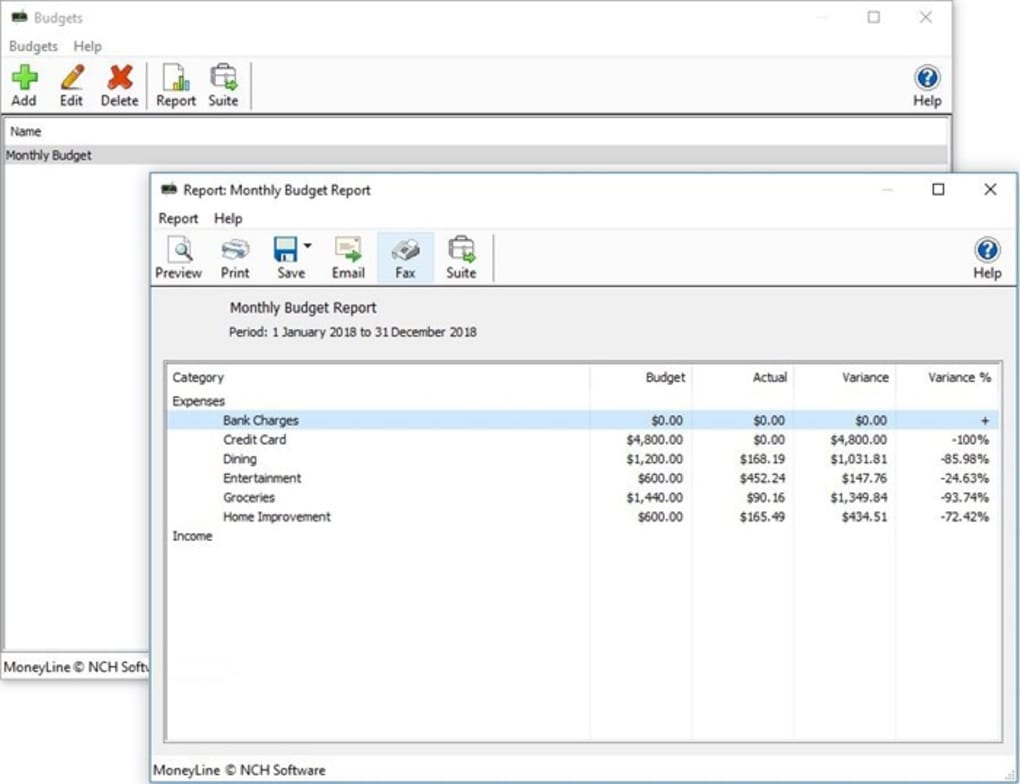
Another standout feature is the customizable budgeting system. Users can set monthly or weekly spending limits for various categories and receive real-time alerts when they approach or exceed their budget. This proactive approach helps prevent overspending and keeps your finances on track. The software also supports multi-account management, allowing you to link multiple bank accounts, credit cards, and investment portfolios in one centralized dashboard. This unified view provides a holistic snapshot of your financial health at a glance.
For those who need detailed reporting, MoneyLine offers advanced financial reporting tools. Generate professional-looking reports on income, expenses, cash flow, and net worth, which can be exported as PDFs or shared with accountants. The investment tracking module lets you monitor stock portfolios, mutual funds, and other assets, including performance metrics and dividend tracking. Additionally, the secure cloud backup ensures your financial data is protected and accessible from any device, even if your primary computer fails. With these features, MoneyLine Professional Edition isn’t just a budgeting tool—it’s a complete financial management ecosystem.
How to Install and Use MoneyLine Professional Edition
Getting started with MoneyLine Professional Edition is straightforward and designed with beginners in mind. To begin, visit the official NCH Software website and download the free trial version compatible with your operating system—Windows, Mac, or mobile (iOS and Android). The installation process is quick and requires minimal technical knowledge. Simply run the installer, accept the license agreement, and follow the on-screen prompts. Once installed, launch the app and create a new account or import data from an existing file (such as CSV or QIF formats).
After setup, the next step is linking your financial accounts. MoneyLine supports secure bank connection via Plaid and Finicity, ensuring encrypted data transmission. You’ll need to enter your bank credentials, but rest assured—your information is never stored on NCH’s servers. Once connected, the software begins importing transactions automatically, usually within minutes. You can then review and adjust categories manually if needed, or let the AI-driven system handle it for you.
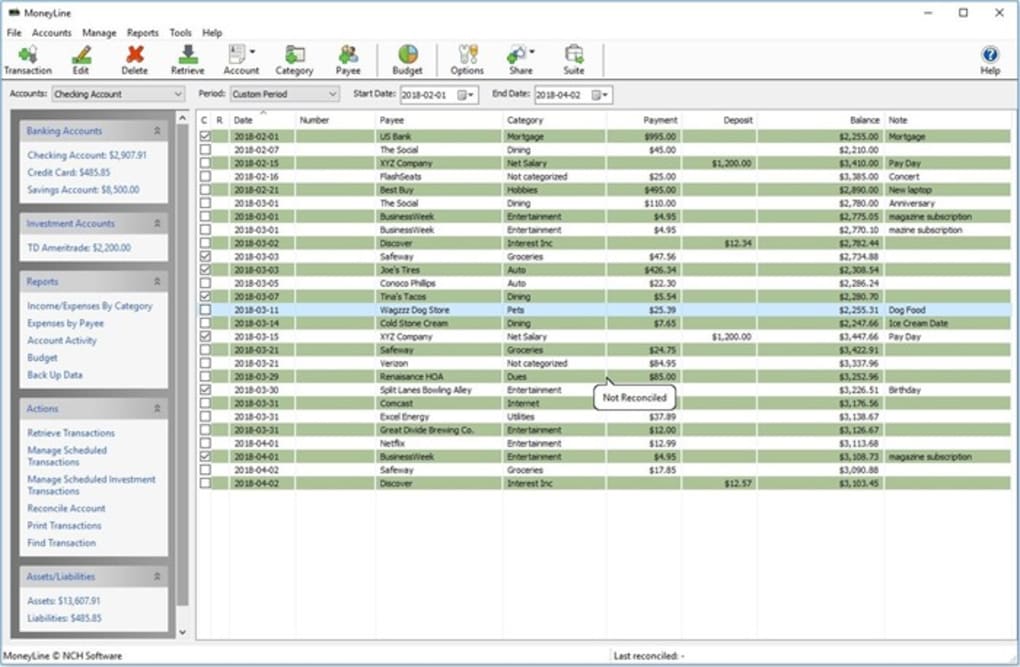
For daily use, navigate the intuitive dashboard to view your spending trends, check your budget progress, and review upcoming bills. Use the “Add Transaction” button to manually record expenses or income. The app also includes a recurring transaction feature, perfect for rent, subscriptions, or regular deposits. Over time, MoneyLine generates insights like “You spent 20% more on dining this month,” helping you identify spending patterns. For business users, the ability to generate invoices, track client payments, and export reports for tax season adds significant value. With regular updates and a responsive support team, MoneyLine ensures you always have access to the latest tools and security patches.
Compatibility and System Requirements
MoneyLine Professional Edition is built for broad accessibility, supporting a wide range of devices and operating systems. It is fully compatible with Windows 10 and Windows 11, offering a native desktop application with full functionality. For Mac users, the software runs smoothly on macOS 10.14 (Mojave) and later, including Apple Silicon (M1/M2) Macs, thanks to native Apple Developer support. This cross-platform compatibility ensures that users can switch between devices without losing data or functionality.
For mobile users, NCH Software provides dedicated apps for both Android and iOS, allowing you to manage your finances on the go. The mobile versions sync seamlessly with the desktop app via cloud storage, so your data stays consistent across devices. Whether you're checking your budget during a commute or recording a spontaneous purchase, the mobile interface is clean, responsive, and easy to navigate.
System requirements are modest, making MoneyLine accessible even on older machines. For Windows, you’ll need at least 2 GB of RAM and 500 MB of free disk space. Mac users require a minimum of 2 GB RAM and 300 MB of free space. The software also works with internet-connected devices, as most features rely on cloud sync. No special hardware is required—just a stable internet connection for real-time updates and bank syncing. With its lightweight design and broad compatibility, MoneyLine Professional Edition is one of the most accessible financial tools on the market, suitable for users of all technical skill levels.
Pros and Cons of MoneyLine Professional Edition
- Pros:
- Free trial with full access to all premium features
- Intuitive, clean interface suitable for beginners and experts
- Automated transaction categorization saves time
- Multi-account and multi-currency support
- Advanced reporting and export options (PDF, CSV)
- Secure cloud backup and bank-level encryption
- Mobile apps for iOS and Android with real-time sync
- Regular updates and responsive customer support
- Cons:
- Free trial is limited to 30 days (no permanent free version)
- Bank sync requires an internet connection
- Advanced features like invoicing are more useful for small businesses
- Customer support response time can vary during peak periods
- Some users report occasional delays in transaction updates
Frequently Asked Questions (FAQ)
- Is MoneyLine Professional Edition free to download?
-
Yes, MoneyLine Professional Edition is available for free download with a full-featured 30-day trial. You can access all premium tools—including budgeting, reporting, and bank syncing—without any cost during the trial period. After the trial, a one-time purchase is required to continue using the software.
- Can I use MoneyLine on both Windows and Mac?
-
Absolutely. MoneyLine is available for both Windows and macOS, and the software syncs your data across devices via the cloud. You can install it on your desktop and use the mobile app on your phone or tablet for seamless access.
- Does MoneyLine support business accounting features?
-
Yes, while designed for personal finance, MoneyLine Professional Edition includes tools for small businesses, such as invoice creation, client tracking, and expense categorization. These features make it a versatile tool for freelancers and micro-business owners.
- How secure is my financial data with MoneyLine?
-
MoneyLine uses bank-grade encryption (SSL/TLS) and secure cloud storage. Your login credentials are never stored on NCH’s servers, and all data is encrypted both in transit and at rest. The software also supports two-factor authentication for added security.
- Can I import data from other financial software?
-
Yes, MoneyLine supports importing data from popular formats like CSV, QIF, and OFX. This makes it easy to migrate from other tools like Quicken, Excel, or Google Sheets without losing your financial history.
Final Verdict and Call to Action
After thorough testing and real-world use, MoneyLine Professional Edition proves to be one of the most reliable, user-friendly, and feature-rich personal finance tools available today. Whether you're managing household budgets, tracking small business income, or simply trying to get a clearer picture of your financial health, this software delivers. Its combination of automation, security, and cross-platform access makes it a top choice for users who value efficiency and peace of mind.
While the free trial is limited to 30 days, the investment in the full version is well worth it for anyone serious about financial control. With regular updates, responsive support, and a clean design, MoneyLine continues to evolve to meet modern financial needs. If you're ready to take charge of your money and avoid the stress of disorganized finances, don’t wait.
Download MoneyLine Professional Edition today and start managing your finances like a pro—secure, smart, and stress-free.
Guides & Tutorials
How to install MoneyLine Professional Edition
- Click the Download button above.
- Once redirected, accept the terms and click Install.
- Wait for the MoneyLine Professional Edition download to finish on your device.
How to use MoneyLine Professional Edition
This software is primarily used for its core features described above. Open the app after installation to explore its capabilities.
User Reviews
No reviews yet. Be the first to share your experience.
You may also like
more
Llama 2
Free-to-use large language model As the new addition to Meta’s arsenal of langua...

NotebookLM
Revolutionizing the note-taking and idea-generation process NotebookLM is an exp...

Github co pilot
AI-inspired software development and coding platform GitHub Copilot is a browser...

Google Gemma
Google’s lightweight AI models Introducing Google Gemma , a family of cutting-ed...

AI Image Enlarger
A free app for Windows, by ai-image-larger. AI Image Enlarger is a free software...

DALL E
AI-driven text-to-image transformation engine DALL·E is a free graphic and desig...